 dan
danThe website guide · 15 parts Updated October 2026 · about 50 min read
What Is a Website?
A builder's honest guide.
Everything I've learned about what a website is, what makes one good, how to design it, how to make it convert, and how to get it found on Google. Written in plain English, with live demos you can click.

- 01What is a website?
- 02Website vs landing page vs funnel
- 03Types of websites
- 04Why you still need one
- 05Planning before you build
- 06Domains, hosting & builders
- 07What makes a good website
- 08How to design a good website
- 09Writing words that sell
- 10Speed, mobile & accessibility
- 11How to make it convert
- 12Tracking, testing & follow-up
- 13What is SEO?
- 14How to get found on Google
- 15Cost, care & choosing help
On this page
- 01What is a website?
- 02Website vs landing page vs funnel
- 03Types of websites
- 04Why you still need one
- 05Planning before you build
- 06Domains, hosting & builders
- 07What makes a good website
- 08How to design a good website
- 09Writing words that sell
- 10Speed, mobile & accessibility
- 11How to make it convert
- 12Tracking, testing & follow-up
- 13What is SEO?
- 14How to get found on Google
- 15Cost, care & choosing help
- +Glossary
- +FAQ
What is a website?
Let's start with the plain answer, then I'll show you what actually happens behind the screen every time someone visits your site.
A website is a group of connected web pages that live under one address (a domain name, like websitesandfunnelsbydan.pro), are stored on a server connected to the internet, and can be opened by anyone with a web browser. For a business, a website is your always-open storefront: the place people check before they call, book or buy.
That's the dictionary version. Here's mine, after years of building sites and watching how real visitors behave on them: a website is a conversation you have with a stranger when you're not in the room. Someone heard about you, saw an ad, or searched Google at 11pm with a leaking pipe. They land on your page and, in about three seconds, they decide whether you understand their problem. Everything I build starts from that moment.
So yes, a website is technology. But for a business owner it's really three things at once: a sign that tells people what you do, a salesperson that answers their questions, and a front desk that takes the call, the booking or the order.
How a website actually works (in plain English)
You don't need to be technical to own a great website, but knowing the moving parts helps you make better decisions and spot bad advice. Here's what happens when someone types your address into their phone:
- They type your domain (or click a link). The domain is just a human-friendly name for your site.
- Their browser asks the internet's phone book, called DNS, where that domain lives. DNS answers with the address of the server.
- The browser contacts that server, which is a computer that stores your site's files and is switched on 24/7. This is your hosting.
- The server sends back the files: HTML (the structure and words), CSS (the design: colors, fonts, layout) and JavaScript (the interactive parts, like a price calculator or a booking calendar).
- The browser puts it all together and draws the page on screen. On a well-built site this takes a second or two. On a slow one, visitors leave before it finishes.
What is a website domain?
A domain is the name of your website, like yourbusiness.com. You rent it yearly from a registrar such as Namecheap, GoDaddy, Cloudflare or Google's successor services. It's separate from hosting: think of the domain as your street address and hosting as the actual building. You can move buildings and keep the address.
What is a website URL or website address?
A URL is the full address of one specific page. The domain is part of it. For example, in https://websitesandfunnelsbydan.pro/demos/hvac, the "https://" means the connection is secure, "websitesandfunnelsbydan.pro" is the domain, and "/demos/hvac" is the exact page. Every page on your site has its own URL, which matters a lot for Google, because Google ranks pages, not whole websites.
What is web hosting?
Hosting is the service that keeps your website's files on a server and sends them to visitors. Some platforms bundle it in (Wix, Squarespace, Shopify, Lovable). Others, like a self-installed WordPress site, need you to buy hosting separately. Good hosting is fast, secure and backed up. Cheap hosting is usually the reason a site feels slow.
What is a static website vs a dynamic website?
A static website shows the same pre-built pages to everyone. It's fast, cheap to host and hard to hack, which makes it great for many small business sites and landing pages. A dynamic website builds pages on the fly from a database: think online stores, member logins, booking systems or dashboards. Most modern sites are a mix: mostly static pages for speed, with dynamic pieces like forms, carts and calculators where needed.
| Static website | Dynamic website | |
|---|---|---|
| Best for | Service businesses, portfolios, landing pages | Stores, memberships, booking, apps |
| Speed | Very fast | Depends on the build |
| Content changes | Edit and republish | Updates from a database or dashboard |
| Cost to run | Low | Higher |
What is a web browser?
The browser is the app people use to view websites: Chrome, Safari, Edge, Firefox or Samsung Internet. Each draws pages slightly differently, which is why a professional build gets tested on more than one. And since most of your visitors are on a phone, the phone browser is the one that matters most.
Want a website that explains what you do in three seconds? That's exactly what I build.
Email meWebsite vs web page vs landing page vs funnel vs web app
These words get mixed up constantly, even by agencies. Mixing them up is expensive, because each one has a different job.
A web page is one single page. A website is a collection of pages about your whole business. A landing page is one page with one goal, usually for visitors coming from an ad or email. A funnel is a planned series of pages that moves someone step by step toward a sale or booking. A web app is software that runs in the browser, like a dashboard or booking system.
| Type | Main job | Number of goals | Typical traffic |
|---|---|---|---|
| Web page | Show one piece of content | Varies | Any |
| Website | Represent the whole business | Several (call, book, learn, buy) | Google, word of mouth, social |
| Landing page | Convert one offer | One | Paid ads, email, campaigns |
| Funnel | Guide a visitor through steps | One end goal, several steps | Ads, lead magnets, retargeting |
| Web app | Let users do a task | Task-based | Logged-in users |
The website: your home base
A business website is where people go to check you out. It has a homepage, service pages, an about page, contact details and usually some proof that you're real. It serves several kinds of visitors at once: the one who's ready to call, the one comparing three companies, and the one who just wants your opening hours.
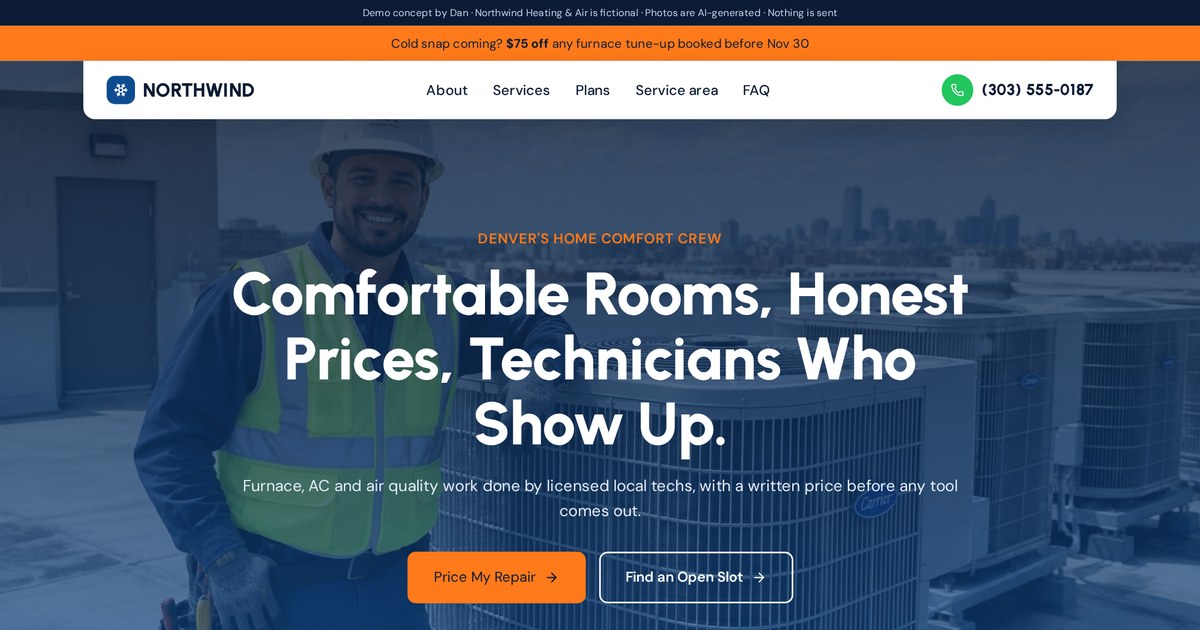
Notice how the homepage serves several visitors: a big call button for emergencies, service photos for researchers, membership plans for repeat customers and a ZIP checker for people asking "do you even cover my area?"
Open the live demoThe landing page: one page, one job
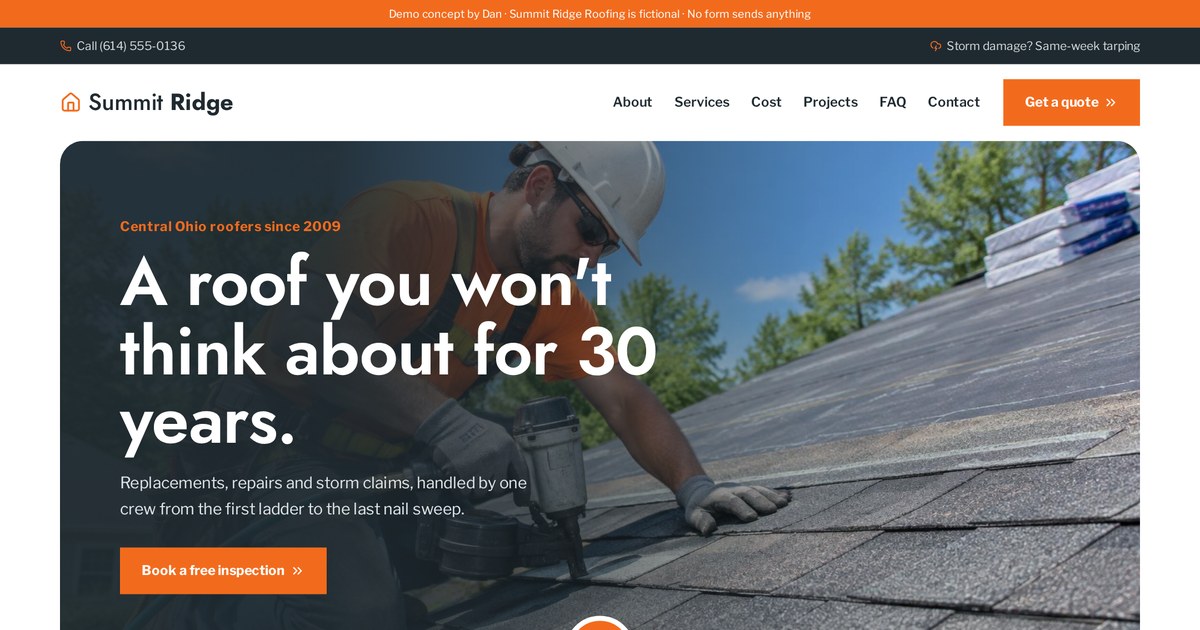
A landing page removes almost every exit. Usually there's no full menu, no blog link and no "about our history" section. If someone clicked an ad that said "Free roof inspection this week," the page they land on should talk only about that free inspection and how to book it. This is called message match, and it's the single biggest reason landing pages beat homepages for paid traffic.
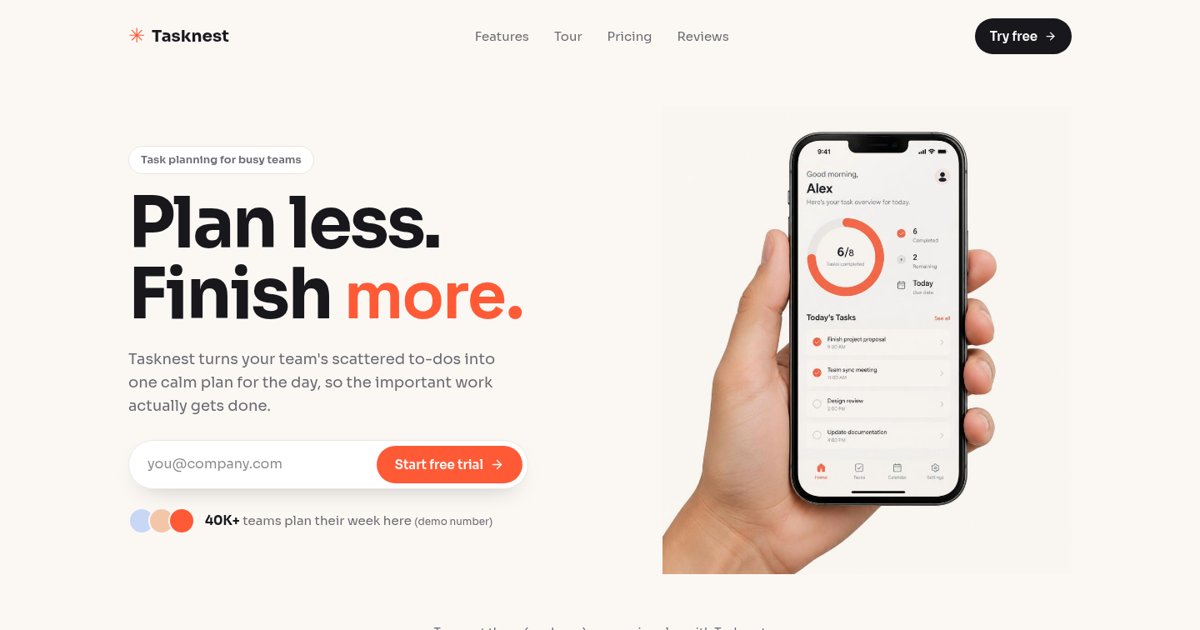
One product, one promise, one action: sign up. Everything on the page (features, pricing toggle, reviews) exists only to support that one button.
Open the live demoThe funnel: a planned journey
A funnel is a sequence: ad, then opt-in page, then a short quiz or offer, then a booking or checkout, then follow-up emails and texts. Each step has one small job, and together they turn a cold visitor into a customer. Funnels shine when the decision is bigger, like a roof replacement, a coaching program or a high-ticket service, because people need more than one touchpoint.
Click through the whole journey from ad to opt-in to quiz to booking, and open the "Under the hood" panel to see the tracking events, tags and automations firing at each step.
Open the live demoThe web app: software in the browser
A web app lets people do something, not just read something: manage deals, track shipments, view reports. Customer portals, dashboards and booking systems are web apps. They cost more to build because they include logins, databases and logic.
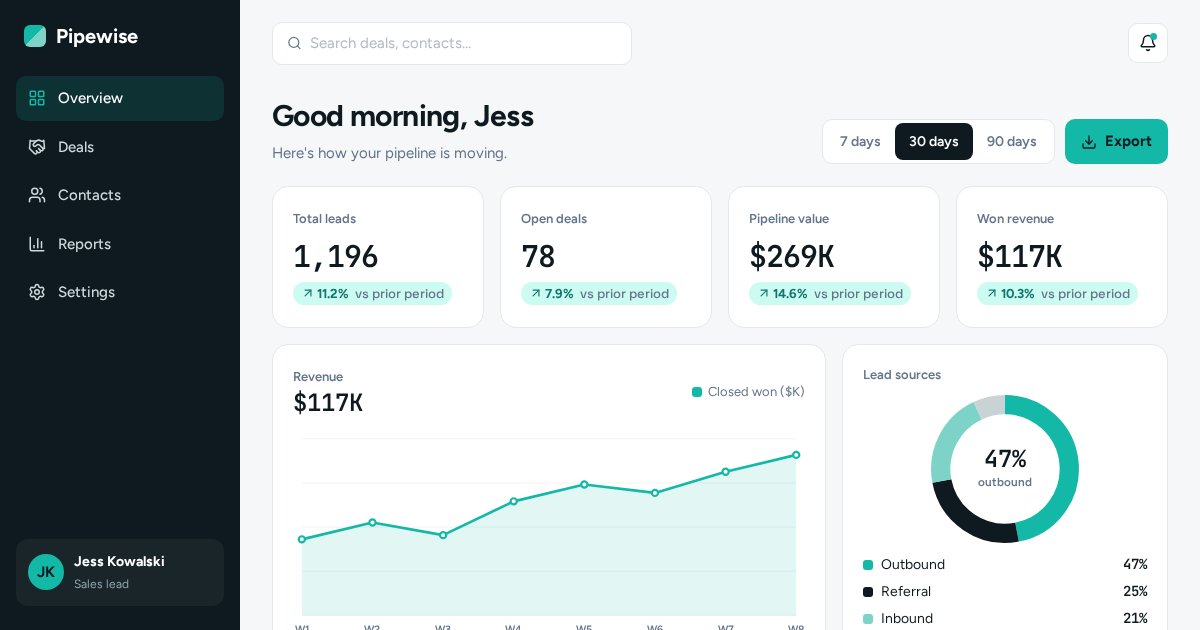
Switch the date range and watch every chart, number and table update. That's the difference between a page you read and an app you use.
Open the live demoWhich one do you need?
- Just starting out and people search for your service? Start with a website.
- Running ads for one offer? Add a landing page for each offer.
- Selling something that takes more thought or trust? Build a funnel.
- Customers need to log in, track or manage something? You need a web app.
Most growing businesses end up with a website plus a few landing pages, and later a funnel or two. That's the setup I usually recommend, because each piece does the job it's best at.
Types of websites (by what they need to do for your business)
Most lists of website types sort them by technology. I sort them by the job they need to do, because that's what decides the design.
Before I design anything I ask one question: what should a visitor do on this site that makes you money? The answer puts almost every business site into one of these groups.
1. Lead generation websites
For service businesses like HVAC, plumbing, roofing, law firms, dentists, solar and cleaning. The goal is a phone call, a quote request or a booked appointment. Design priorities: a clear phone number, a short form above the fold, proof of the service area, and some kind of instant answer, like a price estimate, so people don't have to call just to get a rough number.
The roof cost estimator gives visitors a ballpark in seconds, then naturally leads into the inspection form. People who used the calculator are warmer when they reach the form.
Open the live demo2. Booking websites
For clinics, salons, restaurants, coaches and gyms. The goal is a reserved time slot. The booking tool should be visible right away, not hidden on page three, and it should take as few taps as possible.
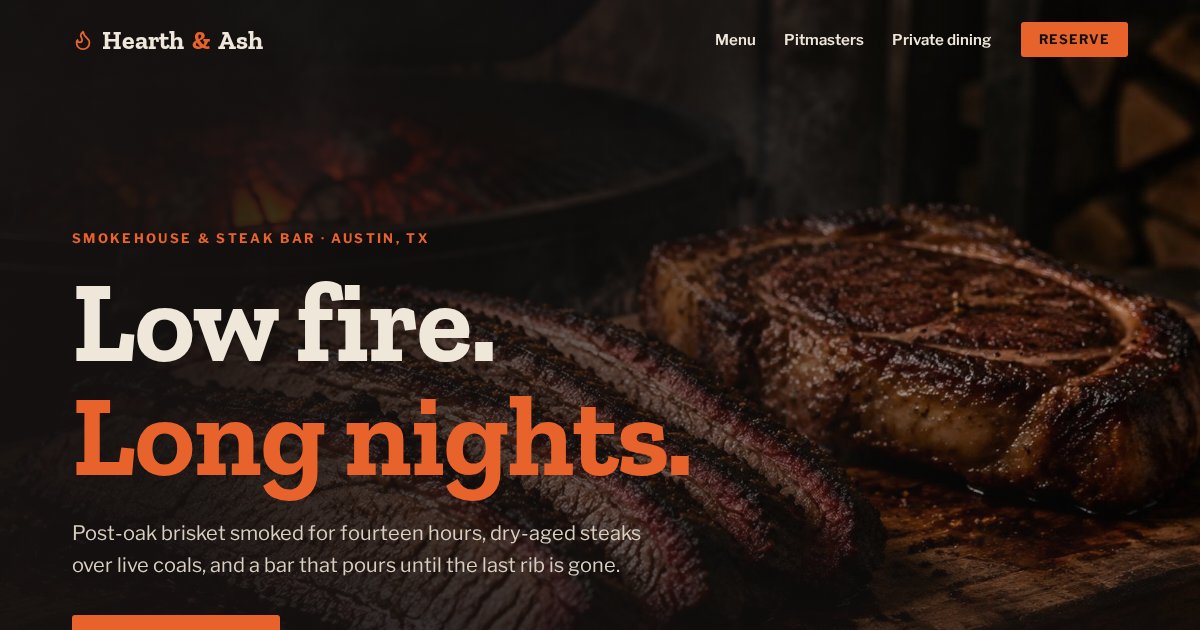
Guests, date and time sit in one bar near the top. A restaurant visitor usually wants two things: the menu and a table. This page puts both within one scroll.
Open the live demo3. E-commerce websites (online stores)
The goal is a purchase. What matters most: fast search, honest product photos, clear prices with no surprise fees, an easy cart and a checkout with as few steps as possible.
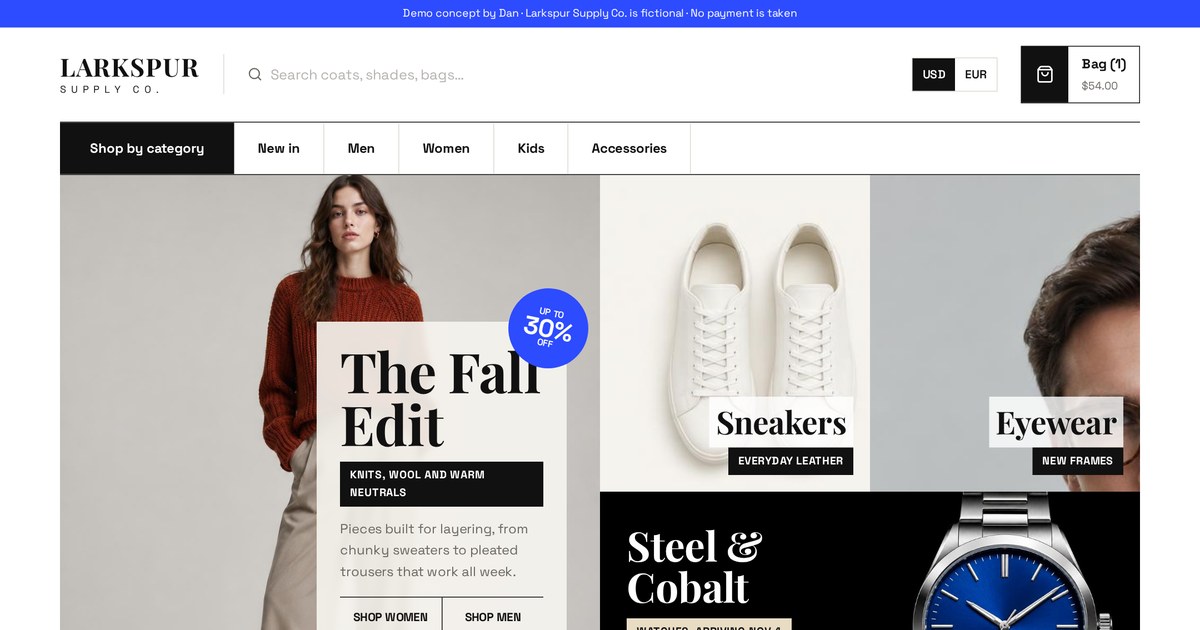
Try the live search, the currency switch and the slide-out cart. Shoppers can keep browsing while the cart stays one tap away.
Open the live demo4. Membership and community websites
Gyms, clubs and online programs. The goal is a sign-up and then retention. Show the plans side by side, make the schedule or content easy to explore, and make the first step feel small.
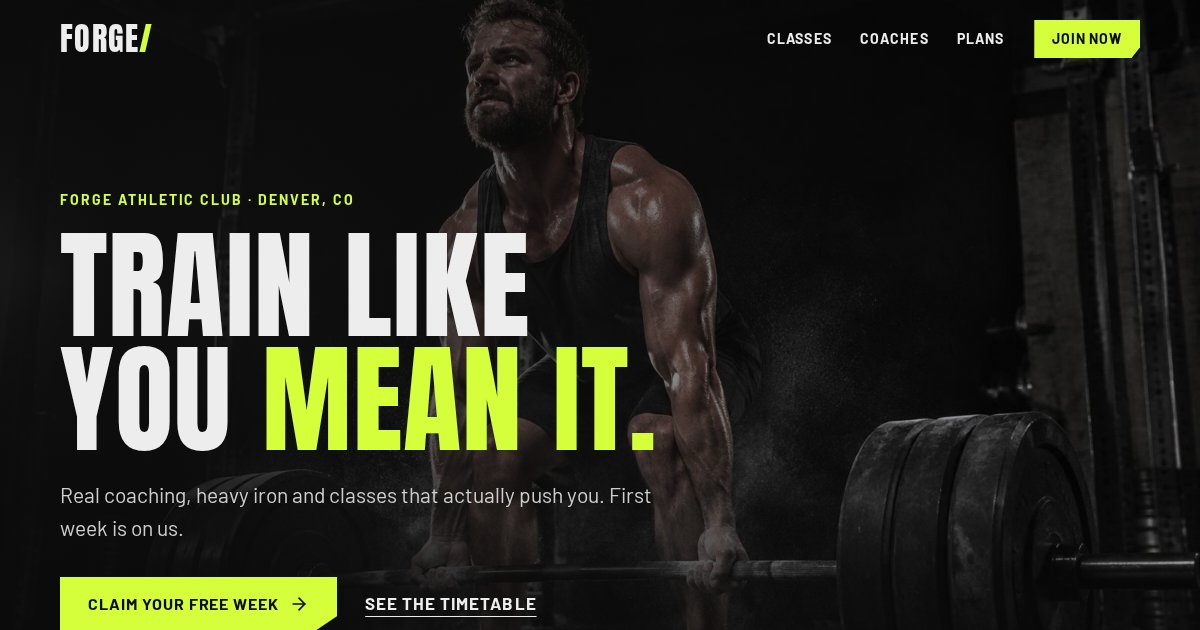
The filterable class timetable answers "is there a class when I'm free?" before anyone has to ask. That question kills a lot of gym sign-ups when it goes unanswered.
Open the live demo5. Non-profit and cause websites
The goal is a donation, a volunteer or a share. These sites need emotional storytelling backed by concrete proof of where the money goes.
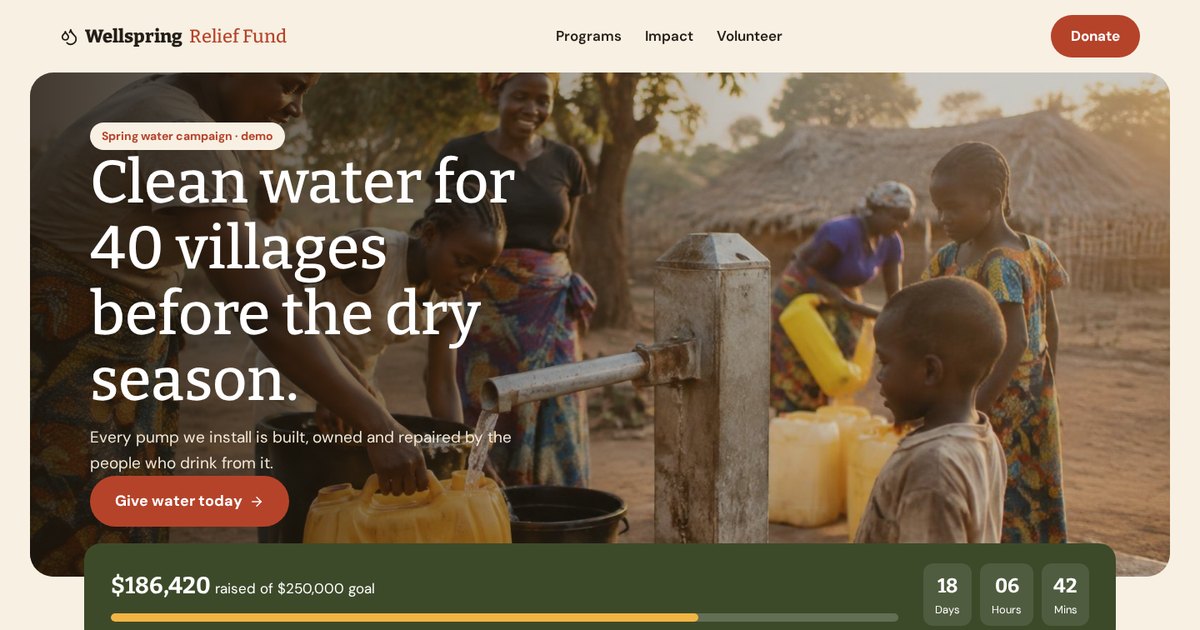
The donation builder shows exactly what each amount pays for, and the campaign goal bar adds a sense of momentum.
Open the live demo6. Content and authority websites
Blogs, guides, publications and personal brands. The goal is trust and, over time, search traffic. This very guide is an example: it exists to answer your questions in depth and show how I think.
7. Portfolio websites
For designers, photographers, builders and creatives. The work is the proof. My own site is a portfolio, which is why it's mostly live demos you can click instead of claims you have to believe.
8. SaaS and product websites
For software companies. The goal is a trial, a demo call or a paid plan. These pages need to make an abstract product feel concrete, ideally by letting visitors play with it.
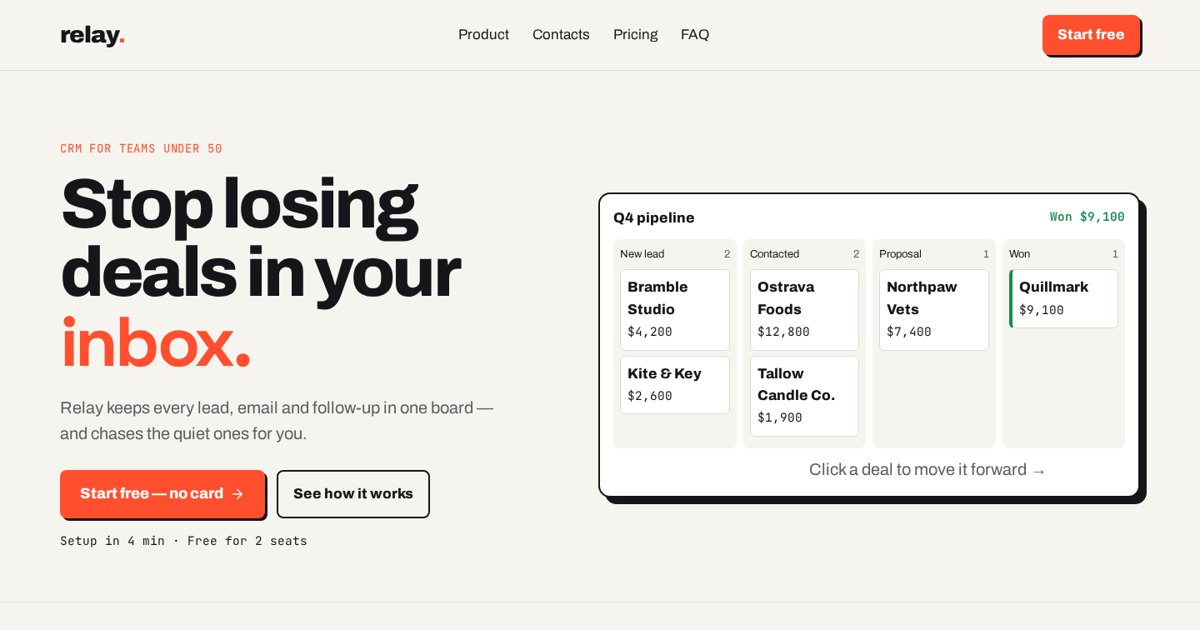
The clickable pipeline board lets visitors feel the product before signing up. Showing beats telling.
Open the live demoWhy your business still needs its own website in 2026
"I have Facebook and Instagram, isn't that enough?" I hear this every month. Here's my honest answer.
Social media is fantastic for reach, and marketplaces like Google Maps, Yelp, Etsy or Amazon are fantastic for being discovered. But all of them are rented land. The platform decides what people see, changes the rules whenever it likes, and puts your competitors right next to you. Your website is the only place online that you fully own.
Five reasons I still tell every business to have one
- Trust. When people hear about you, many of them search your name. If nothing professional shows up, or only a social profile with three posts, they quietly pick someone else.
- Control. You decide the message, the order, the offer and the next step. No algorithm, no competitor ads in the sidebar.
- Search. Google sends people to websites. A good site can bring in customers every day without paying per click.
- Advertising. Paid ads work much better when they land on a page built for that ad. You can't build a custom landing page inside Instagram.
- Data. With your own site you can see where visitors come from, what they click and where they drop off, then improve it.
What about AI answers and chatbots?
More people now ask Google's AI Overviews or chat assistants for recommendations. Those tools still pull their information from websites. If your site clearly explains what you do, where you work, what it costs and why you're credible, you give those systems something solid to quote. If you have no site, you're relying on whatever scraps they find elsewhere. I cover how to prepare for this in Part 14.
When a simple website is enough
Not every business needs a big site. A local service business can do very well with a strong homepage, one page per main service, an about page and a contact page. That's five to eight pages done properly, which beats forty pages done badly.
Planning a website before you build: goals, sitemap and wireframes
Most bad websites aren't bad because of design. They're bad because nobody decided what they were for. Planning is where good websites are actually made.
The questions I ask every client before I design anything
- What is the one action you want most visitors to take? (Call, book, buy, request a quote, sign up.)
- Who is the ideal customer, and what problem are they trying to solve when they find you?
- Where will visitors come from? Google, ads, referrals, social? This changes how the page should open.
- What makes you the safer or better choice compared with the next three companies they'll check?
- What questions or doubts stop people from contacting you today?
- What proof do you have? Photos of real work, reviews, licenses, years in business, guarantees.
- What happens after someone fills in the form? Who replies, and how fast?
Those answers become the brief. If you can't answer them yet, that's fine. Working them out is part of my job, and it usually takes one good call.
Sitemap: planning your pages
A sitemap (in the planning sense) is simply the list of pages and how they connect. For a typical service business I start with this:
- Home: who you are, what you do, for whom, and the main next step.
- One page per main service: each service is its own page so it can rank on Google for that service.
- Service area or location pages, if you serve several towns.
- About: the people, the story and why you can be trusted.
- Reviews or work: proof.
- Contact or booking: the finish line.
- Legal pages: privacy policy, terms and, if you use tracking, a cookie policy.
There's also a technical "XML sitemap", which is a file that lists your pages for Google. I explain that one in Part 14.
What is a website wireframe?
A wireframe is a simple black-and-white sketch of a page that shows where things go (headline, photo, form, buttons, sections) without colors or final design. It's the blueprint before the building. Wireframes are cheap to change, so this is where we argue about order and priorities, not after the design is finished.
Content first, design second
Design should be built around real words and real photos, not placeholder text. If you design first and write later, you end up squeezing your message into boxes that don't fit it. I prefer to draft the key messages (headline, services, proof, calls to action) before choosing colors.
Set a goal you can measure
"Look more professional" is a fine wish but a weak goal. A better goal is "get 20 quote requests a month from Google" or "cut the cost per booked call from our ads." A measurable goal tells us what to build, what to track, and later whether it worked.
Not sure what your site should do? Send me a short note and I'll help you work out the plan, even before we talk design.
Email meDomains, hosting and website builders: how I choose the platform
The platform question gets more attention than it deserves, but picking the wrong one can still trap you. Here's how I decide.
What is a website builder?
A website builder is a tool that lets you create a website without writing code from scratch, usually with drag-and-drop editing or, more recently, AI that builds pages from a description. Wix, Squarespace, Webflow, Shopify, GoHighLevel and AI builders like Lovable are all website builders. Most include hosting.
The main options compared
| Platform | Good for | Watch out for |
|---|---|---|
| WordPress | Content-heavy sites, blogs, flexible budgets | Plugin overload, updates and security upkeep |
| Wix / Squarespace | Simple sites you want to edit yourself | Less control over speed and advanced features |
| Webflow | Design-heavy marketing sites | Learning curve, pricing per site |
| Shopify | Online stores | App fees add up; less ideal for non-store sites |
| GoHighLevel | Funnels, CRM and automations in one place | Design can look generic without care |
| AI builders (Lovable, Bolt, Replit) | Fast, custom, modern builds | Needs someone who knows conversion and structure |
| Fully custom code | Complex apps and unusual needs | Higher cost, needs a developer to maintain |
How I actually choose
- Who will edit it? If you want to change text weekly yourself, the editing experience matters more than anything else.
- What does it need to do? A brochure site, a store, a funnel with automations and a customer portal are four very different jobs.
- What does it connect to? Your CRM, email tool, booking system, payment provider and ad tracking should all plug in cleanly.
- How fast and secure will it be out of the box?
- Can you leave? You should be able to take your domain, content and data with you.
Most of the demos on my site were built with a modern AI-powered builder. That lets me get a working, fast, custom page live in days instead of weeks, and spend the saved time on the parts that actually make money: the message, the layout and the follow-up.
Domains and email
Use your domain for email too (you@yourbusiness.com rather than a free address). It looks more professional, and it keeps your emails out of spam folders when your site sends form notifications. Set it up through Google Workspace, Microsoft 365 or a similar provider.
SSL and https
The padlock and "https" mean the connection between the visitor and your site is encrypted. Browsers warn visitors away from sites without it, and Google prefers secure pages. Nearly every modern host includes it free. If yours doesn't, switch.
What makes a good website? My honest view
Good looks are the least important part of a good website. I'll say that as a designer. Here's what actually matters, in order.
A good website makes it instantly clear what you do, who it's for and what to do next; loads fast on a phone; earns trust with real proof; and guides each visitor to one clear action. Design supports those jobs; it doesn't replace them.
1. Clarity in the first three seconds
When a visitor lands, they should be able to answer three questions without scrolling: What is this? Is it for me? What do I do next? If your headline is "Welcome to our website" or "Excellence in every detail," you've used your most valuable space to say nothing.
- Weak: "Quality solutions for your home."
- Better: "Same-day furnace repair in Denver. Upfront prices, no overtime fees."
2. One job per page
Every page should have one main action. Book a call, buy the thing, request a quote. Other links can exist, but they shouldn't compete. When a page asks visitors to do six things, most do none.
3. Speed
A slow site isn't just annoying; it loses money. Visitors on mobile data won't wait. I treat speed as a design requirement, not a technical afterthought (more in Part 10).
4. Trust you can see
People are cautious online. They look for signs that you're real: photos of actual staff and work, real reviews, licenses, a physical area you serve, clear prices or price ranges, guarantees, and a real way to reach you. Fake stock photos of smiling handshakes do the opposite.
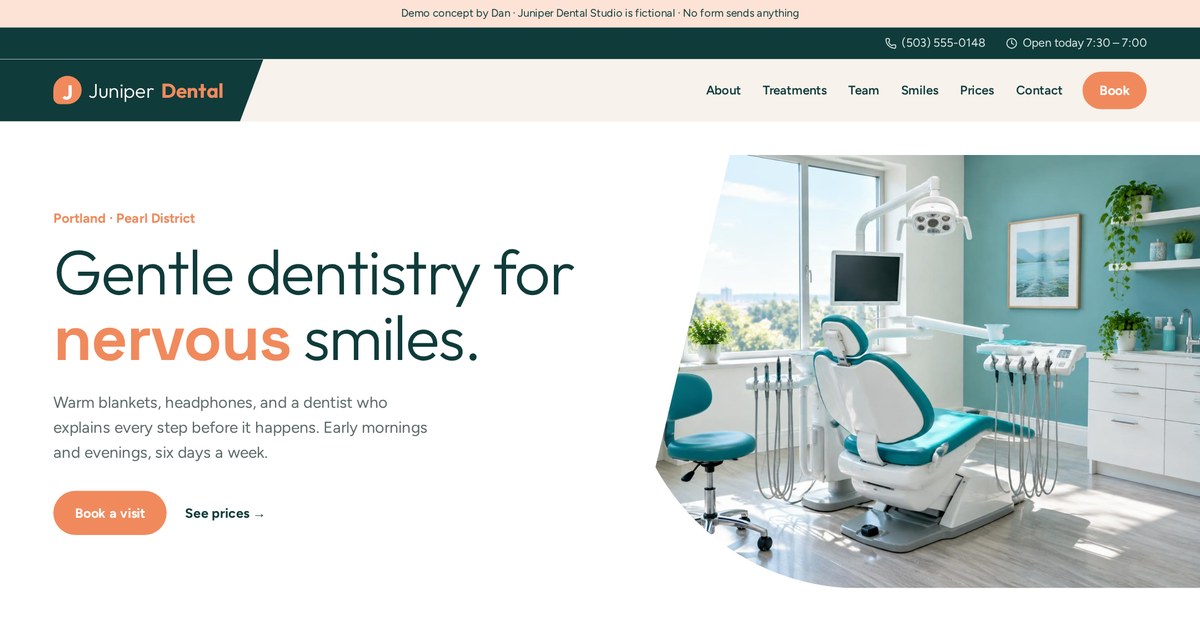
Treatment tabs answer "what will this involve?", the before-and-after slider shows results, and the booking form is never more than a scroll away. Nervous patients need reassurance before they need a button.
Open the live demo5. Built for phones first
For most local businesses, the majority of visitors arrive on a phone. That means thumb-friendly buttons, a tap-to-call number, short forms and text big enough to read without zooming. I design the phone version alongside the desktop version, not as a squashed copy of it.
6. Answers to the real questions
Price, timing, area, process, what happens if something goes wrong. If visitors have to call to get basic answers, many won't bother. Good sites answer the top questions on the page itself, usually with an FAQ and clear service sections.
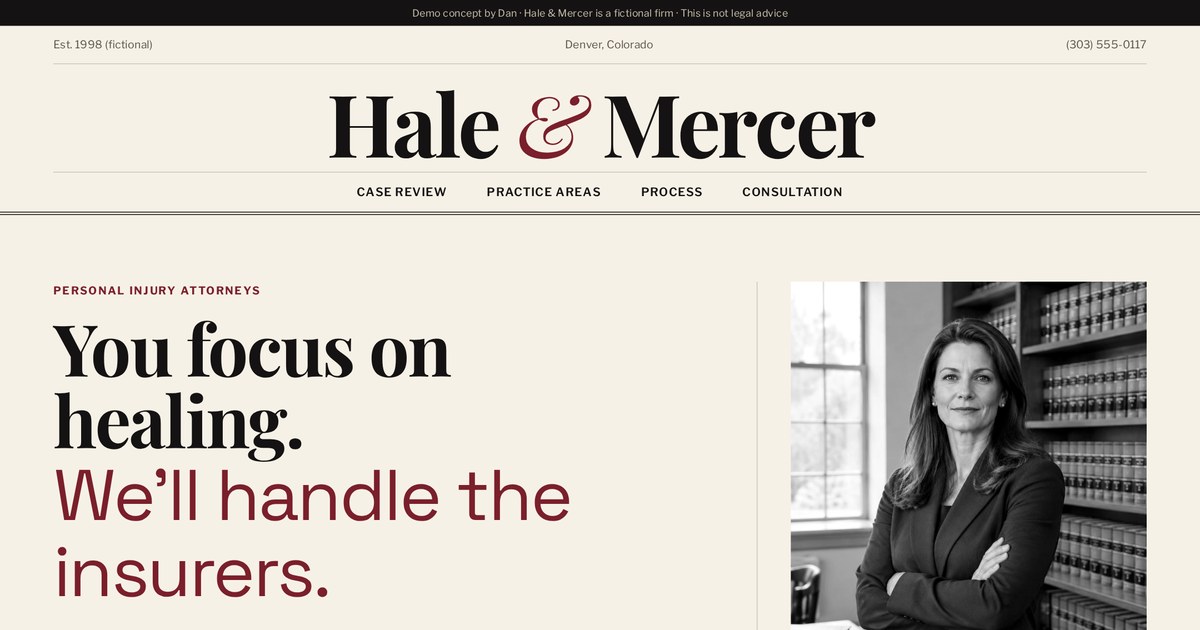
The step-by-step case evaluator answers the question every potential client has ("do I even have a case?") before asking for a consultation. It lowers the scary first step.
Open the live demo7. Personality
Last on my list, but it matters: the site should feel like you, not like a template. Every demo on my site has its own colors, fonts and layout because a church, a casino and a law firm should not look like siblings.
How to design a good website (my process, step by step)
This is the part people imagine when they think of web design. It comes after planning for a reason.
Step 1: Structure the page like a conversation
I lay out sections in the order a visitor's questions come up. For most service pages it goes like this:
- Hero: what you do, for whom, and the main action.
- Proof strip: reviews, ratings, logos or years in business, in one glance.
- Problems or services: "Here's what we fix."
- How it works: three or four simple steps, so the process feels easy.
- Interactive helper: estimator, quiz or checker that gives instant value.
- Deeper proof: photos of work, reviews, guarantees.
- FAQ: handle the last doubts.
- Final call to action: repeat the offer and the button.
Step 2: Pick a visual direction that fits the business
Colors and fonts send signals before anyone reads a word. A law firm might use deep reds, ivory and a classic serif to feel established. A gym might use black and acid lime with tall bold type to feel intense. A wellness coach might use sand and sage to feel calm. The mistake is choosing what's trendy instead of what fits.
- Use one main accent color for buttons and keep it for actions only, so people learn what's clickable.
- Pair at most two fonts: one with character for headings, one easy to read for body text.
- Keep body text large enough (around 17-18px on screen) and lines not too long.
- Leave white space. Crowded pages feel cheap and are harder to scan.
Step 3: Use real, honest imagery
Real photos of your team, your work and your place beat stock photos every time. If you must use stock or generated images, choose ones that look natural, show people's faces fully, and avoid fake signs or gibberish text. Visitors can smell fake, and it costs you trust.
Step 4: Make navigation obvious
Keep the main menu short: five to seven items. Put the main action as a button on the right. On phones, keep the call or book button visible even when the menu is closed.
What is a breadcrumb on a website?
A breadcrumb is the small trail of links near the top of a page, like Home > Guides > What Is a Website. It shows visitors where they are and lets them jump back up a level. It also helps Google understand how your pages are organized, and Google sometimes shows the breadcrumb in search results. Breadcrumbs are most useful on sites with several levels, like stores, guides and service areas.
Step 5: Add one interactive tool that answers a real question
This is my favorite part and something I build into almost every page. Instead of making people call to find out a price, give them a calculator. Instead of a wall of plan descriptions, give them a three-question quiz. These tools keep people engaged, give them a reason to trust you, and warm them up for the form.
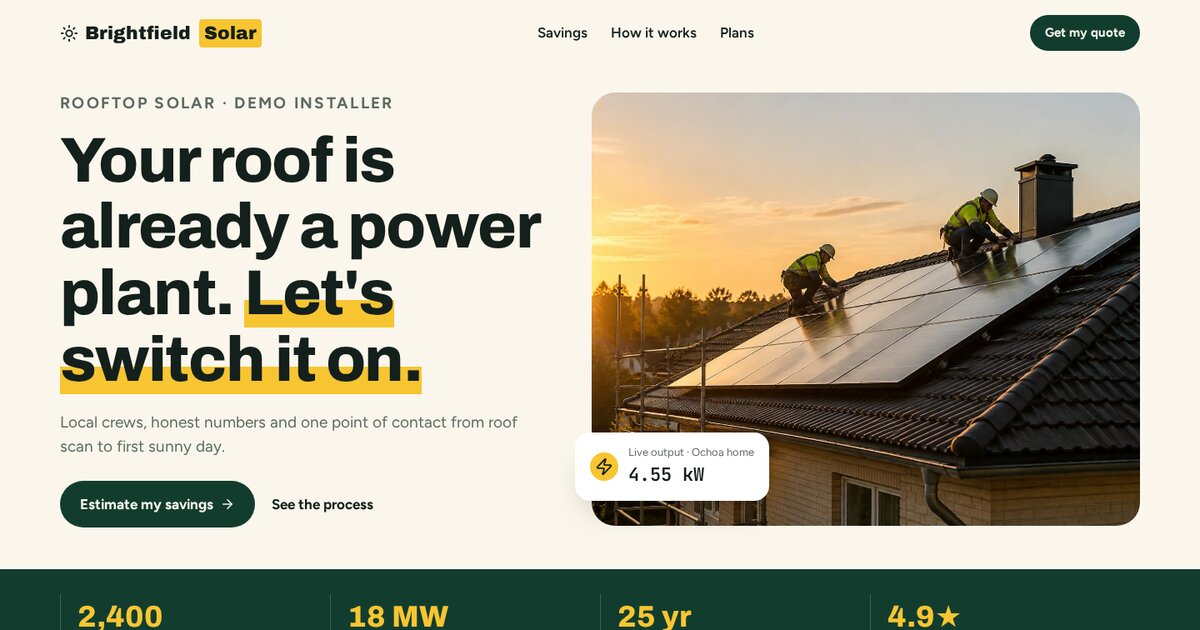
Slide your monthly bill and the savings calculator shows an estimate instantly. Every solar buyer wants to know "is this worth it for me?" Answering it on the page is a strong reason to stay.
Open the live demo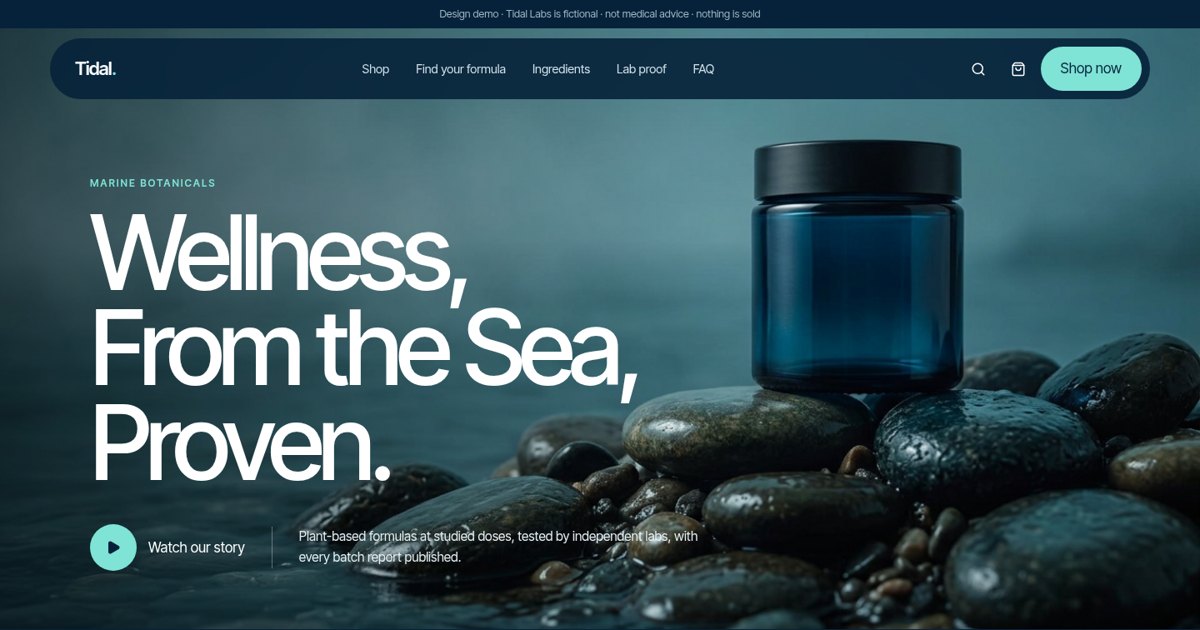
A premium look built from big confident type, generous space and a restrained ocean palette. The formula quiz and ingredient hotspots turn browsing into discovery.
Open the live demoStep 6: Design every state
What does the form look like when it's sent? When there's an error? When the cart is empty? Professional design covers these moments too, because that's exactly when visitors are deciding whether to trust you.
Writing website words that sell (headlines, titles and calls to action)
People don't buy designs; they buy what the words promise. Here's how I write pages that get read.
Write for skimmers
Most visitors scan. They read the headline, the subheadings, the bold bits and the buttons. If those alone tell the story, you've won. Use short paragraphs, clear subheadings, bullet points and plain words.
Headlines: say the outcome
A good headline says what the customer gets, not what you are. Lead with the outcome, add something specific, and remove anything vague.
| Vague | Specific |
|---|---|
| Your trusted plumbing partner | Burst pipe? A plumber at your door in 90 minutes. |
| Innovative wealth solutions | Know exactly when you can retire, and how much you'll have. |
| Welcome to our gym | Strength classes at 6am, 12pm and 6pm. First week free. |
What is a website title?
A website title (the "title tag") is the page name that shows in the browser tab and, more importantly, as the blue clickable headline in Google results. It's different from the big headline on the page, though they often overlap. Each page should have its own unique title of roughly 50-60 characters that includes the main search phrase and a reason to click, for example: "Emergency Plumber in Austin | 90-Minute Response | Copperline." Along with the title, write a meta description: the one or two sentences under the title in Google that sell the click.
Benefits over features
A feature is what something is. A benefit is what it does for the person. "10-year warranty" is a feature. "If it fails in the next ten years, we fix it free" is a benefit. Use both, but lead with the benefit.
Calls to action that people actually click
- Say what happens: "Get my free estimate" beats "Submit."
- Reduce the fear: add a small line under the button like "Takes 30 seconds. No spam."
- Use first person where it fits: "Start my project" often feels more personal than "Start your project."
- Repeat the main call to action several times down the page, so it's there whenever someone is ready.
Write the way your customers talk
Customers say "my AC is blowing warm air," not "HVAC system underperformance." Use their words. Read your reviews, listen to sales calls, look at the questions people ask. Those phrases make the best headlines and, as a bonus, they're often exactly what people type into Google.
Cut the fluff
Delete "we are passionate about," "industry-leading," "one-stop shop" and "we pride ourselves." Replace them with facts: numbers you can back up, guarantees, specific services, real names.
Website speed, mobile design and accessibility
These three get called "technical," but they decide whether people can use your site at all.
Why speed matters
Every extra second a page takes to load gives the visitor another chance to hit back and choose a competitor. Google also uses page experience as one of many signals. A fast page feels more professional before anyone reads a word.
Core Web Vitals in plain English
Google measures page experience with a few metrics called Core Web Vitals. You don't need to memorize them, but here's what they mean:
- Largest Contentful Paint (LCP): how fast the main content (usually the big image or headline) appears. Google's guideline for a good score is within 2.5 seconds.
- Interaction to Next Paint (INP): how quickly the page responds when someone taps or clicks. It should feel instant.
- Cumulative Layout Shift (CLS): whether things jump around while loading. You know the feeling when you go to tap a button and it moves. That's bad CLS.
You can test any page for free with Google's PageSpeed Insights.
How I keep sites fast
- Compress and properly size images, and use modern formats like WebP.
- Load only the fonts and scripts the page actually needs.
- Avoid piling on plugins, widgets, sliders and chat bubbles that each add weight.
- Use good hosting with a content delivery network, so files come from a server near the visitor.
- Reserve space for images so the layout doesn't jump.
Mobile-first design
Google mostly looks at the mobile version of your site when deciding rankings. And your visitors are probably on phones too. Mobile-first means I design for the small screen first: big tap targets, short forms, sticky call or book buttons, and no tiny text or side-by-side columns that don't fit.
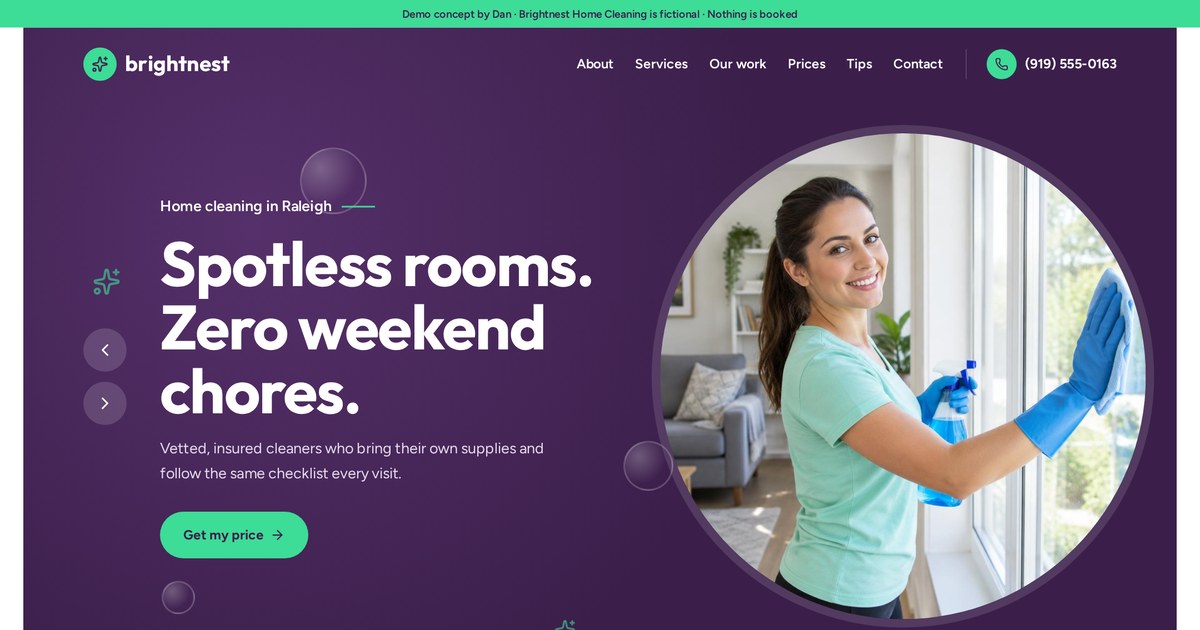
Open it on your phone. The price builder works with your thumb, and a sticky button keeps "Get my estimate" in reach while you scroll.
Open the live demoAccessibility: designing for everyone
Accessibility means people with disabilities can use your site, including people who use screen readers, can't use a mouse, have low vision or are color-blind. It's the right thing to do, it can reduce legal risk in some countries, and it usually makes the site better for everyone.
- Strong color contrast between text and background.
- Alt text on images that describes what they show, so screen readers can read them (and Google can understand them).
- Every button and form field has a clear label.
- The whole site works with a keyboard.
- Don't rely on color alone to show meaning, like errors in red with no text.
- Captions or transcripts for videos.
How to make a website convert visitors into customers
This is where my background matters most. I've spent years close to the numbers behind Google and Meta campaigns, so I design pages around how visitors actually behave after the click.
A website "converts" when a visitor takes the action you want: calls, books, buys or fills in a form. Your conversion rate is the share of visitors who do it. To raise it, match the page to the visitor's intent, make the offer clear, remove friction and doubt, and make the next step easy and visible.
1. Message match
Whatever got the visitor to click (an ad, a search result, an email) made a promise. The first thing they see on the page must keep it, using similar words. If the ad says "Free AC tune-up for new customers" and the page opens with "Welcome to Bob's HVAC, serving since 1998," the visitor wonders if they're in the wrong place.
2. A clear, specific offer
"Contact us" is not an offer. "Get a free 20-minute roof inspection and a written estimate within 24 hours" is. Offers give people a reason to act now and make the next step feel concrete.
3. Forms that feel easy
- Ask only for what you need right now. Name, phone and one qualifying question often beat ten fields.
- Split longer forms into small steps. A two-step form that starts with an easy question often gets more completions than one long form.
- Use the right keyboard on phones (numbers for phone fields).
- Say what happens next: "We'll text you within 15 minutes during business hours."
- Show a proper confirmation, not just a blank reload.
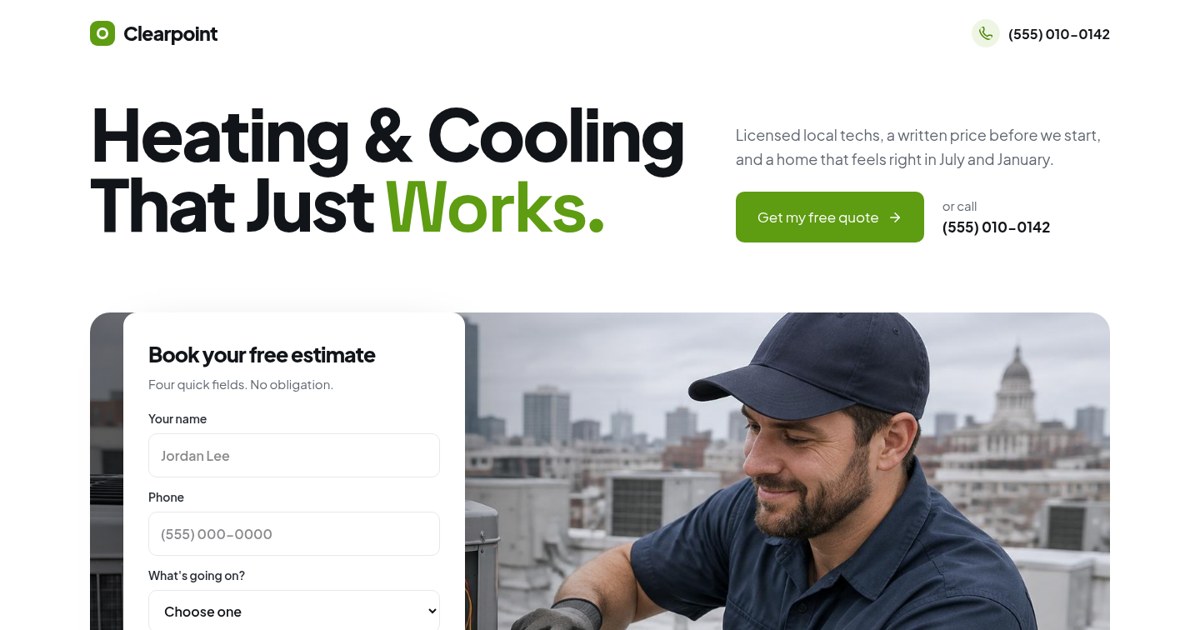
The four-field estimate form sits right on the hero photo. Tap a problem card further down and it pre-fills the form for you. Small touches like this remove effort at exactly the right moment.
Open the live demo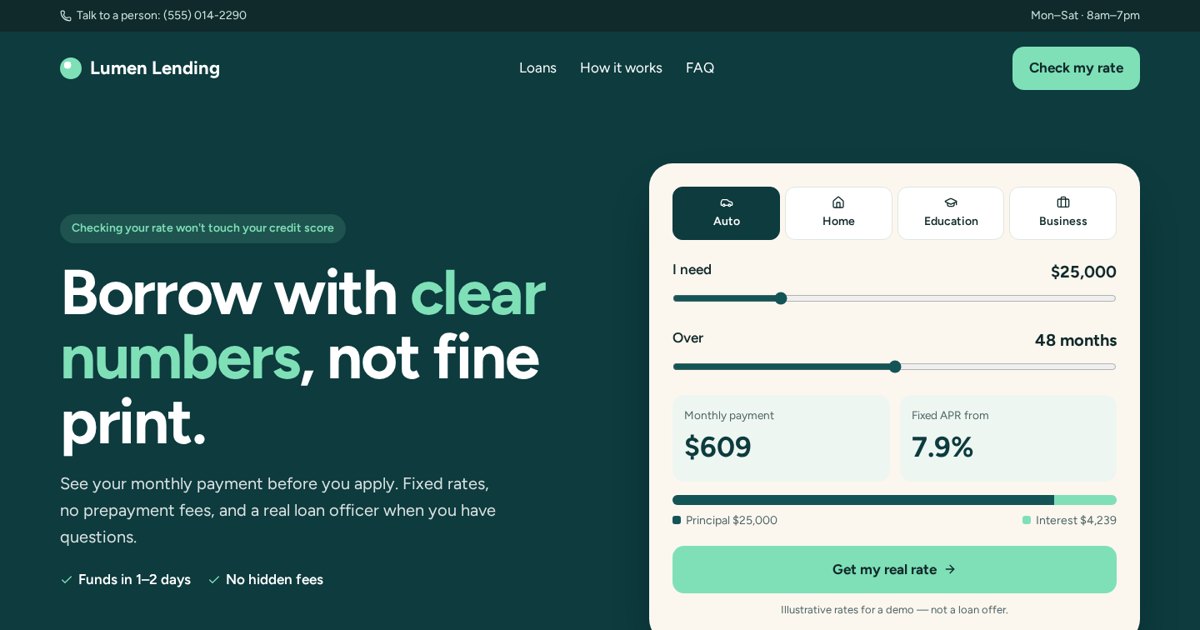
The live loan calculator gives instant value, and the two-step "check your rate" form starts with an easy question. Big decisions need small first steps.
Open the live demo4. Remove doubt at the point of action
Right next to your button, answer the fear in the visitor's head. Is it free? Will I get spammed? Is there a contract? How fast will someone reply? Put reviews, guarantees and privacy notes close to the form, not just at the bottom of the page.
5. Give a reason to stay: interactive value
Calculators, quizzes, checkers and configurators turn a passive visitor into an engaged one. By the time someone has used your estimator, they've already invested a little effort and learned something useful from you. That makes the form feel like the natural next step.
6. Funnels for bigger decisions
When the decision is expensive or emotional, one page often isn't enough. A funnel breaks it into steps: a helpful offer to start, a short quiz to qualify, a booking step, then follow-up for people who didn't book yet.
Watch each stage do one small job, and see the tags and follow-up automations fire behind the scenes. This is how I plan funnels for clients.
Open the live demo7. Make it easy to contact you in every way
Some people want to call, some want to text, some want a form, some want to book a time themselves. Offer the main one prominently and the others nearby. On phones, a tap-to-call button is often the highest-converting element on a local service page.
Common conversion killers
- Sending ad traffic to the homepage.
- Autoplay sliders that hide the main message.
- No price information at all, not even a range.
- Forms that ask for too much too soon.
- Slow pages on mobile.
- No proof that you're real.
- A chat bubble, popup and cookie banner all fighting for the screen at once.
If your site gets visitors but not enough calls or bookings, that's exactly the problem I like solving.
Email meTracking, testing and follow-up: how good websites keep getting better
Launch day isn't the finish line. The best sites improve every month because someone is watching what visitors actually do.
Set up tracking from day one
If you don't measure, you're guessing. At a minimum I set up:
- Google Analytics (GA4): how many visitors you get, where they come from and what they do.
- Google Tag Manager: one place to manage all your tracking codes without editing the site each time.
- Conversion events: form submits, calls, bookings and purchases tracked as goals.
- Ad pixels (Meta Pixel, Google Ads tag) if you run ads, so the platforms can learn who converts.
- Google Search Console: how your site appears in Google search (more in Part 14).
UTMs: knowing which link worked
UTM tags are little labels added to the end of a link, like ?utm_source=facebook&utm_campaign=spring-offer. They tell your analytics exactly which ad, email or post sent each visitor. Without them, a lot of traffic shows up as a vague "direct" with no clue where it came from.
What to look at each month
- Conversion rate by page: which pages turn visitors into leads, and which don't.
- Traffic source: which channels bring people who actually convert, not just clicks.
- Drop-off points: where people leave forms or funnels.
- Mobile vs desktop: big differences usually mean a mobile problem.
- Top search queries in Search Console: what people searched to find you.
Testing and CRO basics
CRO stands for conversion rate optimization: making changes on purpose and measuring whether they help. An A/B test shows two versions of a page to different visitors and compares results. You need enough traffic for tests to mean anything, so smaller sites should focus on obvious fixes first and test later.
Where I start testing, in order: the headline, the offer, the main button and its wording, the form length, and the order of sections. Heatmap and session recording tools like Microsoft Clarity or Hotjar show where people click, scroll and give up, which often reveals problems you'd never guess.
Follow-up: where most leads are won or lost
A website can generate a lead in seconds, and the business can lose it in an afternoon by replying too late. Speed matters: people often contact several companies, and the first one to reply has an advantage.
- Send an instant confirmation email or text so people know they've been heard.
- Notify your team immediately, and set a clear reply-time target.
- Add the lead to your CRM (GoHighLevel, HubSpot, ActiveCampaign or similar) with tags for the service they asked about.
- Set up a short follow-up sequence for people who didn't book yet: a helpful tip, an answer to common doubts, then a gentle reminder.
What is SEO on a website?
SEO sounds technical and mysterious. At its core it's simple: help Google understand your pages, and make those pages the best answer for the people searching.
SEO (search engine optimization) is the work of making your website easier to find in unpaid search results on Google and other search engines. It covers what's on your pages (content and keywords), how your site is built (speed, structure, mobile), and how much the rest of the web trusts you (links, reviews and mentions).
How Google works in three steps
- Crawling: Google's robots follow links around the web and discover your pages.
- Indexing: Google reads each page, works out what it's about and stores it in its huge index.
- Ranking: when someone searches, Google picks the pages from its index that best answer that search, considering relevance, quality, usefulness, location and many other signals.
If a page isn't crawled, it can't be indexed. If it isn't indexed, it can't rank. A lot of SEO problems on small business sites are actually basic: pages Google can't find, or pages that don't clearly say what they're about.
Search intent: the most important SEO idea
Every search has a purpose behind it. "What is a website" is someone learning. "Web designer near me" is someone hiring. "Wix login" is someone going somewhere specific. Google tries to show pages that match that purpose. A sales page won't rank for a learning search, and a long guide won't rank for "plumber near me." Match the page type to the intent.
Keywords: the words people actually type
Keywords are the phrases people search. Good keyword research finds phrases with three things: real search demand, competition you can realistically beat, and a clear connection to what you sell. For a local business, specific phrases like "emergency plumber in Tampa" or "furnace repair cost" usually bring better customers than broad terms like "plumbing."
The three areas of SEO
| Area | What it covers | Examples |
|---|---|---|
| On-page SEO | What's on each page | Titles, headings, content, images, internal links |
| Technical SEO | How the site is built | Speed, mobile, sitemap, indexing, secure https |
| Off-page SEO | How others vouch for you | Links from other sites, reviews, business listings, mentions |
My on-page SEO checklist
- One clear topic per page, with the main phrase in the title tag, the main heading and the first paragraph.
- A unique title and meta description for every page.
- Clear headings (H1, H2, H3) that follow a logical outline.
- Clean, readable URLs like /services/furnace-repair.
- Descriptive alt text on images.
- Internal links between related pages, using descriptive link text.
- Structured data (schema) that tells Google facts like your business name, services, reviews or article author.
- Content that genuinely answers the question better than what's already ranking.
Technical SEO basics
- An XML sitemap that lists your pages, submitted in Google Search Console.
- A robots.txt file that doesn't accidentally block important pages.
- Fast, mobile-friendly pages.
- Secure https everywhere.
- No broken links or duplicate copies of the same page.
- Canonical tags so Google knows the main version of each page.
What is a website cookie?
Since it comes up so often alongside SEO and tracking: a cookie is a small file a website stores in your browser to remember things, like what's in your cart, whether you're logged in, or that you've visited before. Analytics and ad tools also use cookies to measure visits. Depending on where your visitors live (for example the EU or UK), you may need to ask permission before setting non-essential cookies and explain them in a cookie policy.
How to get your website found on Google (step by step)
Here's the practical playbook I follow for new sites, in the order I'd do it. None of it is magic, and most of it you can start today.
Step 1: Make sure Google can see your site
- Create a free Google Search Console account and verify your domain.
- Submit your XML sitemap (usually yoursite.com/sitemap.xml).
- Use the URL Inspection tool to request indexing of your most important pages.
- Check the Pages report over the following weeks for anything Google couldn't index, and why.
A newly submitted sitemap can show "Couldn't fetch" for a day or two before Google actually reads it. That's common and usually sorts itself out.
Step 2: Claim your Google Business Profile (for local businesses)
If customers come to you or you go to them, your Google Business Profile is often more important than your website for "near me" searches. It's what shows in the map results. Fill in every field: categories, services, service area, hours, photos, and a link to your site. Then ask happy customers for reviews and reply to every review.
Step 3: One page per service, and per area if relevant
Google ranks pages, not businesses. A single "Services" page listing ten things will struggle to rank for any of them. Give each main service its own page with real detail: what it is, signs you need it, process, pricing guidance, FAQs and proof. If you serve several towns, create location pages with genuinely local content, not copy-pasted text with the city name swapped.
Step 4: Get your titles and descriptions right
Your title tag and meta description are your ad in the search results. Include the phrase people search, your location if local, and a reason to choose you. Better titles can increase clicks even before rankings improve.
Step 5: Create genuinely helpful content
Write about the questions customers ask you every week. How much does it cost? How long does it take? Repair or replace? What should I ask before hiring? A thorough answer from a real expert, with examples and opinions, is exactly what Google says it wants to reward. Thin, generic articles written only for keywords tend not to last.
This guide is my own example of this step. It's long because the question is big, it's written in my voice because it's my experience, and it links to live demos you can actually use.
Step 6: Build trust signals and links
- List your business in relevant directories and platforms for your industry and location, with consistent name, address and phone.
- Get mentioned by partners, suppliers, local organizations, podcasts and industry sites.
- Create things worth linking to: tools, guides, local data, useful templates.
- Collect reviews steadily on Google and other trusted platforms.
Step 7: Prepare for AI search
Google's AI Overviews and chat-style assistants answer many questions directly. To be the source they draw from, make your pages easy to quote: put a short, direct answer near the top of each topic (like the boxes in this guide), use clear headings phrased as questions, add structured data, and show who wrote the content and why they're qualified.
Step 8: Measure, improve, repeat
Every month, check Search Console for the searches you appear for. Pages that show up on page two are your best opportunities: improve them with more depth, better titles and internal links. Keep publishing helpful pages on a steady schedule.
How long does SEO take?
Honest answer: usually months, not days. A brand-new site often needs a few weeks just to be fully indexed, and competitive phrases can take much longer to climb. Local searches with a strong Google Business Profile can move faster. Anyone promising page one in two weeks is either targeting phrases nobody searches or not telling you the whole story.
After launch: website cost, maintenance, mistakes and choosing a designer
The practical stuff people ask me most, answered straight.
How much does a website cost?
It depends on what it needs to do, so treat these as broad, general ranges rather than a quote. Prices vary a lot by country, platform and who builds it.
| Type | Rough scope | What drives the price |
|---|---|---|
| DIY builder site | You build it yourself | Your time, plus a monthly platform fee |
| Single landing page | One page, one offer, tracking | Copywriting, interactive tools, integrations |
| Small business website | 5-10 pages | Number of pages, content writing, custom design |
| Funnel | Several pages plus automations | Steps, CRM setup, email and SMS follow-up |
| Online store | Products, cart, checkout | Number of products, payment and shipping setup |
| Web app or portal | Logins, data, dashboards | Features and complexity |
Also budget for the ongoing costs: domain (yearly), hosting or platform fees (monthly), email, any paid tools, and maintenance or updates.
How long does it take to build?
With modern builders, a focused landing page can go live in days and a small business website in a couple of weeks, if the content and decisions are ready. The most common delay isn't the build; it's waiting for text, photos and approvals. That's why I plan content early.
Maintenance, security and backups
- Keep the platform, themes and plugins updated (especially on WordPress).
- Use strong passwords and two-factor login for every account.
- Make sure there are automatic backups you can actually restore.
- Test your forms monthly. Broken forms are silent and expensive.
- Keep content fresh: prices, hours, photos, staff and offers.
Legal pages your website needs
Most business sites should have a privacy policy (what data you collect and why), terms of use, and, if you use tracking cookies, a cookie policy and possibly a consent banner depending on your visitors' location. Stores also need refund and shipping policies. This isn't legal advice; requirements vary by country, so check with a professional for your situation.
When should you redesign?
- It looks broken or awkward on phones.
- It's slow, and fixes haven't helped.
- You can't easily update it yourself.
- Your services, prices or positioning have changed.
- It gets visitors but very few calls, bookings or sales.
- You're embarrassed to send people to it.
Sometimes a full redesign isn't needed. Rewriting the headline, simplifying the form and fixing the mobile layout can give most of the benefit for a fraction of the cost.
The 15 website mistakes I see most
- A vague headline that doesn't say what you do.
- No clear main action, or too many competing ones.
- Sending paid ads to the homepage.
- Slow loading on phones.
- Tiny text and buttons on mobile.
- Generic stock photos instead of real ones.
- No proof: no reviews, photos of work or credentials.
- Hiding prices completely.
- Long forms that ask for everything up front.
- One page trying to rank for every service.
- Missing or duplicate page titles.
- No tracking, so nobody knows what works.
- Slow or no follow-up on leads.
- Domain owned by someone else.
- Never updating anything after launch.
DIY or hire a designer?
DIY makes sense when you're just starting, the budget is tiny and the site only needs to exist. Hiring makes sense when the website needs to bring in business, when you're spending money on ads, or when your time is worth more running the business than learning layout tools.
Questions to ask before hiring a website designer
- Can I see live sites you've built, not just screenshots?
- How will this site get me more calls, bookings or sales?
- Will I own the domain, content and accounts?
- Is tracking and form follow-up included?
- Will I see a layout preview before you build?
- Who writes the content?
- Is it built for phones first, and how fast will it be?
- What happens after launch if something breaks?
Red flags: guaranteed number-one rankings, no live examples, you don't own your domain, and nobody asks about your customers or goals.
My website launch checklist
- Domain registered in your own name
- Clear headline: what, who, next step
- One main call to action per page
- Tap-to-call and short form on mobile
- Pages load fast on a phone
- Real photos and visible proof
- One page per main service
- Unique title and description on every page
- Alt text on images
- Privacy policy and other legal pages
- Analytics and conversion tracking set up
- Forms tested and follow-up in place
- Search Console verified and sitemap submitted
- Google Business Profile complete (if local)
Website terms in plain English
- A/B test
- Showing two versions of a page to different visitors to see which performs better.
- Accessibility
- Designing so people with disabilities can use a site.
- Alt text
- A short text description of an image for screen readers and search engines.
- Analytics
- Tools that measure visits and behavior, like Google Analytics.
- Backlink
- A link from another website to yours.
- Bounce
- A visit where someone leaves without interacting further.
- Breadcrumb
- A trail of links showing where a page sits in the site, like Home > Guides.
- Browser
- The app used to view websites: Chrome, Safari, Edge, Firefox.
- Call to action (CTA)
- The button or link asking visitors to take the next step.
- Canonical tag
- A tag telling Google which URL is the main version of a page.
- CDN
- A network of servers that delivers your files from near the visitor, for speed.
- CMS
- Content management system: software for editing a site, like WordPress.
- Conversion
- When a visitor takes the action you want.
- Conversion rate
- The percentage of visitors who convert.
- Cookie
- A small file a site stores in your browser to remember things.
- Core Web Vitals
- Google's measures of loading speed, responsiveness and visual stability.
- CRM
- Customer relationship management software that stores and tracks leads.
- CRO
- Conversion rate optimization: improving pages so more visitors convert.
- Crawling
- Search engines discovering pages by following links.
- DNS
- The internet's address book, linking domains to servers.
- Domain
- Your website's name, like yourbusiness.com.
- Dynamic website
- A site that builds pages from a database as needed.
- Above the fold
- What's visible before scrolling.
- Funnel
- A planned series of steps that leads visitors to a sale or booking.
- Google Business Profile
- Your free business listing on Google Search and Maps.
- Hero
- The first, top section of a page.
- Hosting
- The service that stores your site and sends it to visitors.
- HTML / CSS / JavaScript
- The structure, design and interactive code of web pages.
- Indexing
- Search engines storing and understanding your pages.
- Internal link
- A link from one page on your site to another.
- Keyword
- A word or phrase people type into a search engine.
- Landing page
- A single page with one goal, often for ad traffic.
- Lead
- A potential customer who has shared their contact details.
- Local SEO
- Optimizing to appear in location-based searches and maps.
- Message match
- Making a page repeat the promise of the ad or link that brought the visitor.
- Meta description
- The short summary shown under your title in search results.
- Pixel
- A tracking code from ad platforms that records visits and conversions.
- Responsive design
- A layout that adapts to any screen size.
- Robots.txt
- A file telling search engines which parts of a site to crawl.
- Schema / structured data
- Code that tells search engines specific facts about a page.
- Search intent
- The purpose behind a search.
- SEO
- Search engine optimization: improving visibility in unpaid search results.
- SSL / https
- Encryption that secures the connection to a website.
- Static website
- A site made of pre-built pages that are the same for every visitor.
- Title tag
- The page title shown in browser tabs and as the headline in search results.
- URL
- The full address of a specific web page.
- UTM
- Labels added to links to track which campaign sent a visitor.
- Web app
- Software that runs in a browser, like a dashboard.
- Website builder
- A tool for creating websites without coding from scratch.
- Wireframe
- A simple layout sketch of a page before design.
- XML sitemap
- A file listing your pages for search engines.
Frequently asked questions
What is a website in simple words?
A website is a set of connected pages on the internet that people can open in a browser using one address, like yourbusiness.com. For a business, it's your online storefront and salesperson.
What are the main parts of a website?
A domain name (the address), hosting (where the files live), the pages themselves (built from HTML, CSS and JavaScript), and usually a way to edit them, like a website builder or CMS.
What's the difference between a website and a landing page?
A website represents your whole business and has several pages and goals. A landing page is a single page with one goal, usually built for visitors from a specific ad or campaign.
What makes a website good?
Clarity about what you do and for whom, one obvious next step, fast loading on phones, visible proof that you're trustworthy, and answers to the questions customers actually have.
How many pages should a small business website have?
Often five to ten: home, one page per main service, about, reviews or work, contact, and legal pages. Quality matters more than quantity.
Do I need a website if I have social media?
Yes, in most cases. Social media is rented space with rules you don't control. A website is the one place you own, and it's what Google and ad campaigns send people to.
How do I get my website on Google?
Verify it in Google Search Console, submit your XML sitemap, request indexing of key pages, set up a Google Business Profile if you're local, and publish helpful pages for each service and common question.
How long does it take for a new website to show up on Google?
Indexing can take from a few days to a few weeks. Ranking well for competitive searches usually takes months of steady work.
What is SEO and do I need it?
SEO is improving your site so it appears in unpaid Google results. If customers search for what you offer, yes. Basic SEO should be part of every build.
How much does a website cost?
It ranges widely by scope, from a DIY builder subscription to a custom build with funnels and integrations. The bigger costs are usually content, custom features and integrations, plus ongoing domain, hosting and maintenance.
Should I build my own website or hire someone?
Build it yourself if you just need a basic presence on a tiny budget. Hire someone when the site needs to generate business, when you're running ads, or when your time is better spent elsewhere.
What is a website builder?
A tool that lets you create a website without coding from scratch, like Wix, Squarespace, Webflow, Shopify, GoHighLevel or AI builders such as Lovable. Most include hosting.
Got a website that should be working harder?
Let's build it.
I design and build websites, landing pages and funnels that explain clearly, load fast, convert and get found. Tell me what you're working on.